

变换组件(NTransformComponent)
属性面板介绍
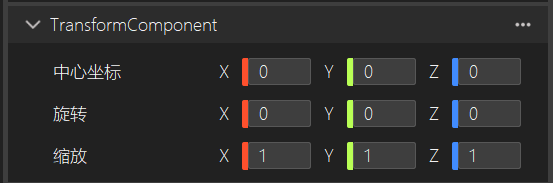
- 中心坐标:调节对象中心的坐标位置。
- 旋转:控制对象在X、Y和Z轴上的旋转。
- 缩放:控制对象在X、Y和Z轴上的缩放。
在场景编辑窗口中进行编辑
NTransformComponent
在引擎中,NTransformComponent是一个非常核心的组件,每个Actor都会有一个Transform组件,它负责控制和存储游戏对象的位置、旋转和缩放。可以认为,Transform 组件是所有游戏对象(如角色、物体、相机等)的“空间位置标识”。理解和操作 Transform 是进行游戏开发和物体行为控制的基础。
| 接口名称 | 返回值 | 接口含义 |
|---|---|---|
| GetWorldTransformMatrix | Matrix4 | 获取世界坐标系变换矩阵 |
| GetLocalTransformMatrix | Matrix4 | 获取相对坐标系变换矩阵 |
| GetWorldPosition | Vector3 | 获取世界坐标系中的位置 |
| GetWorldRotation | Quaternion | 获取世界坐标系中的旋转 |
| SetWorldRotation | void | 设置世界坐标系中的旋转 |
| GetWorldEulerAngle | Vector3 | 获取世界坐标系中旋转值的欧拉角 |
| SetWorldEulerAngle | void | 设置世界坐标系中欧拉角旋转值 |
| GetWorldScale | Vector3 | 获取世界坐标系中缩放值 |
| SetWorldScale | void | 设置世界坐标系中缩放值 |
| GetLocalPosition | Vector3 | 获取相对位置 |
| SetLocalPosition | void | 设置相对位置 |
| GetLocalRotation | Quaternion | 获取相对旋转值 |
| SetLocalRotation | void | 设置相对旋转值 |
| GetLocalEulerAngle | Vector3 | 获取相对旋转角度 |
| SetLocalEulerAngle | void | 设置相对旋转角度 |
| GetLocalScale | Vector3 | 获取相对缩放值 |
| SetLocalScale | void | 设置相对缩放值 |
| LookAt | void | 朝向某一点 |
| SetDirection | void | 设置世界坐标系中的朝向 |
| SetLocalDirection | void | 设置相对朝向 |
| GetDirection | Vector3 | 获取世界坐标系中的朝向 |
| GetLocalDirection | Vector3 | 获取相对朝向 |
| TransformPoint | Vector3 | 将相对坐标转换为世界坐标 |
| InverseTransformPoint | Vector3 | 将世界坐标转换为相对坐标 |
| AddTransformListener | void | 添加transform变化的监听 |
| RemoveTransformListener | void | 移除transform变化的监听 |
获取变换矩阵
const Matrix4& GetWorldTransformMatrix()const;
const Matrix4& GetLocalTransformMatrix()const;
返回值:矩阵
描述:获取世界坐标系和相对坐标系下的变换矩阵。
代码示例:
void NTransformTest::Start()
{
    auto actor = GetNActor();
    auto transform = actor->GetTransformComponent();
    auto worldmatrix = transform->GetWorldTransformMatrix();
    auto localmatrix = transform->GetLocalTransformMatrix();
}
设置和获取世界坐标系中的旋转、位移、缩放
const Vector3& GetWorldPosition() const;
void SetWorldPosition(const Vector3& pos);
const Quaternion& GetWorldRotation() const;
void SetWorldRotation(const Quaternion& rot);
Vector3 GetWorldEulerAngle() const;
void SetWorldEulerAngle(Vector3 eulerAngle);
const Vector3& GetWorldScale() const;
void SetWorldScale(const Vector3& scale);
| 参数 | 说明 |
|---|---|
| pos | 设置世界坐标系中的位置 |
| rot | 设置世界坐标系中的四元素 |
| eulerAngle | 设置世界坐标系中的欧拉角 |
| scale | 设置世界坐标系中的缩放值 |
描述:通过上述接口,可以修改控件在世界空间的旋转,位置和缩放值。 代码示例:
void NTransformTest::Start()
{
    auto actor=GetNActor();
    auto transform=actor->GetTransformComponent();
    transform->SetWorldPosition(Vector3::Zero);
    transform->SetWorldScale(Vector3::One);
    transform->SetWorldRotation(Quaternion::Identity);
    transform->SetWorldEulerAngle({30,0,0});
}
设置和获取相对坐标系中的旋转、位移、缩放
const Vector3& GetLocalPosition() const;
void SetLocalPosition(const Vector3& pos);
const Quaternion& GetLocalRotation() const;
void SetLocalRotation(const Quaternion& rot);
Vector3 GetLocalEulerAngle() const;
void SetLocalEulerAngle(Vector3 eulerAngle);
const Vector3& GetLocalScale() const;
void SetLocalScale(const Vector3& scale);
| 参数 | 说明 |
|---|---|
| pos | 设置相对坐标系中的位置 |
| rot | 设置相对坐标系中的四元素 |
| eulerAngle | 设置相对坐标系中的欧拉角 |
| scale | 设置相对坐标系中的缩放值 |
描述:通过上述接口,可以修改控件在相对坐标系中的旋转,位置和缩放值。这个相对坐标系是相对其父节点控件的。 代码示例:
void NTransformTest::Start()
{
    auto actor=GetNActor();
    auto transform=actor->GetTransformComponent();
    transform->SetLocalPosition(Vector3::Zero);
    transform->SetLocalScale(Vector3::One);
    transform->SetLocalRotation(Quaternion::Identity);
    transform->SetLocalEulerAngle({30,0,0});
}
设置和获取控件的朝向
void LookAt(const Vector3& target, ECoordSystem space = ECoordSystem::World);
void SetDirection(const Vector3& dir);
void SetLocalDirection(const Vector3& dir);
Vector3 GetDirection() const;
Vector3 GetLocalDirection() const;
| 参数 | 说明 |
|---|---|
| target | 设置朝向的目标位置 |
| space | 设置朝向计算所在的坐标系空间 |
| dir | 设置控件的方向向量 |
描述:通过LookAt接口可以将控件朝向目标点,而且可以指定控件的方向向量。 代码示例:
void NTransformTest::Start()
{
    auto actor=GetNActor();
    auto transform=actor->GetTransformComponent();
    transform->LookAt({0,1,10}, ECoordSystem::World);
    transform->GetDirection();
    transform->SetDirection({0,0,1});
}
坐标系转换
Vector3 TransformPoint(Vector3 point);
Vector3 TransformPoint(NFloat x, NFloat y, NFloat z);
Vector3 InverseTransformPoint(Vector3 point);
Vector3 InverseTransformPoint(NFloat x, NFloat y, NFloat z);
| 参数 | 说明 |
|---|---|
| point | 进行坐标系转换的3d空间的点 |
| x,y,z | 进行坐标系转换的点的x,y,z |
描述:通过transformPoint接口可以将相对坐标系的点变换到世界坐标系中,通故InverserTransformPoint接口可以将世界坐标系中的点变换到相对坐标系中。 代码示例:
void NTransformTest::Start()
{
    auto actor=GetNActor();
    auto transform=actor->GetTransformComponent();
    transform->TransformPoint({1,2,3});
    transform->InverseTransformPoint({1,2,3});
}
添加和移除transform变化监听
void AddTransformListener(ITransformListener* listener); void RemoveTransformListener(ITransformListener* listener);
| 参数 | 说明 |
|---|---|
| listener | Transform变化的监听回调 |
描述:如果想要在控件的transform发生变化时做一些逻辑处理,可是通过上述接口添加变化的监听回调。同时为了避免内存泄漏需要主动移除监听。
代码示例:
//先是继承ITransformListener类,然后重写OnTransformChanged回调函数
class NImageViewTest_API NImageViewTest : public NComponent,public ITransformListener
{
	DECLARE_CLASS(NImageViewTest, NComponent)
	DECLARE_RTTI
	ENABLE_REFLECTION
	public:
	NImageViewTest() = default;
	virtual ~NImageViewTest() = default;
	virtual void Start() override;
	virtual void Update() override;
	virtual void OnDestroy() override;
	virtual void PostEditChangeProperty(std::string& propertyName) override;
	virtual void Serialize(Archive& ar) override;
	virtual void LateDeserialize(Archive& ar) override;
	virtual void OnTransformChanged()override;
};

DECLARE_PTR(NImageViewTest)
ENGINE_NAMESPACE_END

//然后调用添加和移除变化监听
void NImageViewTest::Start()
{
    auto actor=GetNActor();
    auto transform=actor->GetTransformComponent();
    transform->AddTransformListener(this);
}

void NImageViewTest::OnTransformChanged()
{
    //transform变化的回调函数
}

void NImageViewTest::OnDestroy()
{
    auto actor = GetNActor();
    auto transform = actor->GetTransformComponent();
    transform->RemoveTransformListener(this);
}