

UI变换组件(NRectTransformComponent)
属性面板介绍
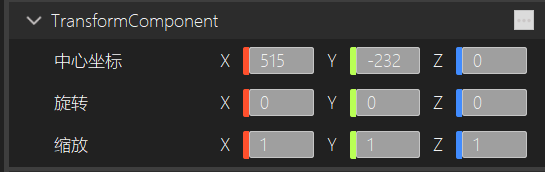
- 中心坐标:调节UI对象中心的坐标位置。
- 旋转:控制UI对象变换在X、Y和Z轴上的旋转。
- 缩放:控制UI对象在X、Y和Z轴上的缩放。
在场景编辑窗口中进行编辑
NRectTransformComponent
NRectTransformComponent是一个特殊的组件,通常用于UI元素的位置、大小和旋转控制。它是 NTransformComponent 的一个扩展,NRectTransformComponent是继承NTransformComponent组件的,主要用于 Canvas 系统 和 UI 元素的布局管理。NRectTransformComponent是 UI 组件中的核心,它处理了 UI 元素在屏幕空间中的定位、缩放以及旋转等属性。
| SetAnchorOffset | void | 设置自身锚点相对父类锚点的偏移量 |
|---|---|---|
| GetAnchorOffset | Vector3 | 获取位置的偏移量 |
| SetHorizontalAlignOffset | void | 设置拉伸模式,左右的对齐间距 |
| SetVerticalAlignOffset | void | 设置拉伸模式,上下的对齐间距 |
| SetAlignOffset | void | 设置拉伸模式,左右上下的对齐间距 |
| GetAlignOffset | Vector4 | 获取拉伸模式,对齐间距 |
| SetMinAnchors | void | 设置最小锚点的值 |
| GetMinAnchors | Vector2 | 获取最小锚点的值 |
| SetMaxAnchors | void | 设置最大锚点的值 |
| GetMaxAnchors | Vector2 | 获取最大锚点的值 |
| SetPivot | void | 设置自身锚点的值 |
| GetPivot | Vector2 | 获取自身锚点的值 |
| SetSize | void | 设置控件的大小 |
| GetSize | Vector2 | 获取控件的大小 |
| SetAlignFlag | void | 设置对齐模式 |
| GetAlignFlag | EAlignFlag | 获取对齐模式 |
设置和获取自身锚点相对父锚点的偏移量
void SetAnchorOffset(Vector3 value);
Vector3 GetAnchorOffset();
| 参数 | 说明 |
|---|---|
| value | 自身锚点相对锚点的偏移量 |
描述:通过以上接口可以设置UI控件相对父控件的相对位置。
代码示例:
void NImageViewTest::Start()
{
    auto actor=GetNActor();
    auto recttransform = actor->GetComponent<NRectTransformComponent>();
    recttransform->SetAnchorOffset({1,1,0});
    auto anchorOffset=recttransform->GetAnchorOffset();
}
在拉伸模式下,设置和获取对齐间接
void SetHorizontalAlignOffset(NFloat left, NFloat right);
void SetVerticalAlignOffset(NFloat top , NFloat bottom);
void SetAlignOffset(NFloat left, NFloat right, NFloat top , NFloat bottom);
Vector4 GetAlignOffset();
参数:
| 参数 | 说明 |
|---|---|
| left | 拉伸模式下,距离父控件左边间接 |
| right | 拉伸模式下,距离父控件右边间接 |
| top | 拉伸模式下,距离父控件上边间接 |
| bottom | 拉伸模式下,距离父控件下边间接 |
描述:在拉伸模式下,设置UI与父控件上下左右对齐的间接。
代码示例:
void NImageViewTest::Start()
{
    auto actor=GetNActor();
    auto recttransform = actor->GetComponent<NRectTransformComponent>();
    recttransform->SetAlignFlag(EAlignFlag::ALIGN_VERTICAL_HORIZONTAL_STRETCH);
    recttransform->SetAlignOffset(2,2,2,2);
    auto alignOffset=recttransform->GetAlignOffset();
}
设置和获取锚点
void SetMinAnchors(Vector2 value);
Vector2 GetMinAnchors();
void SetMaxAnchors(Vector2 value);
Vector2 GetMaxAnchors();
void SetPivot(Vector2 value);
Vector2 GetPivot();
参数:
| 参数 | 说明 |
|---|---|
| value | 设置最小锚点,最大锚点和自身锚点的值 |
描述:通过上述接口可以设置锚点的最大值和最小值,从而改变UI的布局方式,自身锚点表示UI自身的中心点,位置的偏移量和对齐间接都是通过自身锚点与锚点最大值,最小值进行计算得到的。
代码示例:
void NImageViewTest::Start()
{
    auto actor=GetNActor();
    auto recttransform = actor->GetComponent<NRectTransformComponent>();
    recttransform->SetMinAnchors({0,1});
    recttransform->SetMinAnchors({0,1});
    recttransform->SetPivot({0.5,0.5});
}
设置和获取UI的对齐模式
void SetAlignFlag(EAlignFlag flag);
EAlignFlag GetAlignFlag();
参数:
| 参数 | 说明 |
|---|---|
| flag | 设置UI的对齐模式 |
UI对齐枚举:EAlignFlag
ALIGN_NONE = 0,
ALIGN_LEFT_TOP,左上对齐
ALIGN_LEFT_CENTER,左中对齐
ALIGN_LEFT_BOTTOM,左下对齐
ALIGN_CENTER_TOP,中上对齐
ALIGN_CENTER_CENTER,中心点对齐
ALIGN_CENTER_BOTTOM,中下对齐
ALIGN_RIGHT_TOP,右上对齐
ALIGN_RIGHT_CENTER,右中对齐
ALIGN_RIGHT_BOTTOM,右下对齐
ALIGN_HORIZONTAL_STRETCH_TOP,横向上部拉伸两边对齐
ALIGN_HORIZONTAL_STRETCH_CENTER,横向中心拉伸两边对齐
ALIGN_HORIZONTAL_STRETCH_BOTTOM,横向下部拉伸两边对齐
ALIGN_VERTICAL_STRETCH_LEFT,竖向左边上下拉伸对齐
ALIGN_VERTICAL_STRETCH_CENTER,竖向中心上下拉伸对齐
ALIGN_VERTICAL_STRETCH_RIGHT,竖向右边上下拉伸对齐
ALIGN_VERTICAL_HORIZONTAL_STRETCH,横向竖向拉伸对齐
描述:设置UI布局的对齐方式
代码示例:
void NImageViewTest::Start()
{
    auto actor=GetNActor();
    auto recttransform = actor->GetComponent<NRectTransformComponent>();
    recttransform->SetAlignFlag(EAlignFlag::ALIGN_HORIZONTAL_STRETCH_BOTTOM);
    recttransform->SetHorizontalAlignOffset(2,2);
}