

可交互组件
可交互组件(NSelectable)
属性面板介绍
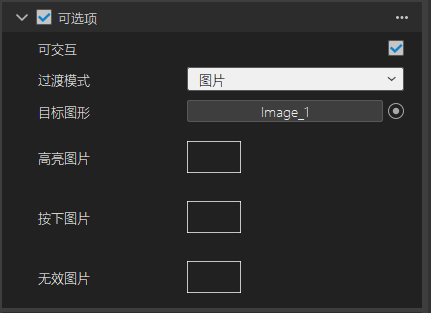
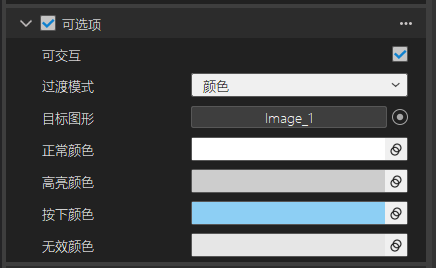
- 可交互:默认是勾选的,如果不勾选则添加此组件的控件不能接收到事件,而且显示效果是无效图片或者无效颜色。
- 过渡模式:可以是图片模式或者颜色模式,两种模式界面截图如上图。
- 目标图形:列表限制只能是图片控件,表示交互时修改的目标控件。
- 高亮图片:当射线选中当前目标控件时,显示的图片。
- 按下图片:当事件按下目标控件时,显示的图片。
- 无效图片:当不勾选可交互勾选框时,显示的图片。
- 正常颜色:当目标控件可交互,并且没有被选中时显示的颜色。
- 高亮颜色:当目标控件被选中时的颜色。
- 按下颜色:当目标控件处于按下事件时,显示的颜色。
- 无效颜色:当不勾选可交互勾选框时,显示的颜色。
NSelectable
NSelectable组件是构建交互式UI的重要组件,提供了方便便捷的属性反射面板。
| 接口 | 返回值 | 说明 |
|---|---|---|
| SetTransitionStyle | void | 设置过渡类型 |
| GetTransitionStyle | ETransitionStyle | 获取过渡类型 |
| SetTexture | void | 设置纹理 |
| SetColor | void | 设置颜色 |
| GetTexture | std::string | 获取纹理 |
| GetColor | Color32 | 获取颜色 |
| SetInteractabled | void | 设置控件是否可交互 |
| IsInteractabled | void | 获取是否可交互状态 |
| SetTargetGraphic | void | 设置目标图形控件 |
| SetSelectionState | void | 设置交互事件类型 |
| GetSelectionState | ESelectionState | 获取交互事件类型 |
设置和获取过渡类型
void SetTransitionStyle(ETransitionStyle style);
ETransitionStyle GetTransitionStyle();
参数:
ETransitionStyle:显示过渡类型,有图片和颜色两种类型。
描述:
通过设置过渡类型可以动态灵活的切换过渡类型,通过事件触发显示不同的效果。
代码示例:
void SelectableTest::Start()
{
    auto selectableCom=GetNActor()->GetComponent<NSelectable>();
    auto transitionStyle= selectableCom->GetTransitionStyle();
    selectableCom->SetTransitionStyle(ETransitionStyle::ETS_IMAGE);
}
设置和获取纹理
void SetTexture(NTexturePtr texture, ESelectionState state);
void SetTexture(const std::string fileName, ESelectionState state);
std::string GetTexture(ESelectionState state)const;
参数:
texture:要设置纹理共享指针;
state:设置纹理对应的交互状态;
fileName:要设置纹理的文件路径;
描述:
当过渡模式设置为图片模式时,通过设置纹理的接口,可以设置指定交互状态对应的纹理。
代码示例:
void SelectableTest::Start()
{
    auto selectableCom=GetNActor()->GetComponent<NSelectable>();
    auto texture=selectableCom->GetTexture(ESelectionState::ES_Highlighted);
    selectableCom->SetTexture(texture, ESelectionState::ES_Pressed);
    selectableCom->SetTexture("Assets/Textures/Skybox.png", ESelectionState::ES_Normal);
}
设置和获取颜色
void SetColor(Color32 color, ESelectionState state);
Color32 GetColor(ESelectionState state)const;
参数:
color:要设置的颜色值;
state:设置颜色对应的交互状态;
描述:
当过渡模式设置为颜色模式时,通过设置颜色接口,可以设置指定交互状态对应的颜色值。
代码示例:
void SelectableTest::Start()
{
    auto selectableCom=GetNActor()->GetComponent<NSelectable>();
    auto color=selectableCom->GetColor(ESelectionState::ES_Highlighted);
    selectableCom->SetColor(Color32::Yellow, ESelectionState::ES_Pressed);
}
设置目标图形控件
void SetTargetGraphic(NActorPtr graphic);
参数:
graphic:只能是图形控件,其他控件设置无效。
描述:
通过以上接口可以指定交互目标控件。
示例代码:
void SelectableTest::Start()
{
    auto selectableCom=GetNActor()->GetComponent<NSelectable>();
    auto imageAct=NActorManager::GetActor("ImageView_0");
    selectableCom->SetTargetGraphic(imageAct);
}
设置和获取可交互状态
virtual void SetInteractabled(bool interactabled);
virtual bool IsInteractabled();
参数:
interactabled:是bool类型,如果是true表示可交互,如果还是false表示不可交互。
描述:
通过设置是否可交互状态接口,可以灵活控制目标图形控件的交互状态。
代码示例:
void SelectableTest::Start()
{
    auto selectableCom=GetNActor()->GetComponent<NSelectable>();
    auto selectable=selectableCom->IsInteractabled();
    selectableCom->SetInteractabled(false);
}